Work from the patient record.
Give authorized agents relevant chart information, encounter history, and your clinic's protocols so they can prepare useful work.
Clinicians and AI, working together
Syntropic is a shared workspace for clinicians and AI assistants, connecting patient information, practice tools, and team workflows.
AI assistants automate routine work in check-in, documentation, and billing to help lower labor costs. Your team controls access, reviews the work, and makes the clinical decisions.
Use Syntropic's built-in assistants or connect compatible AI assistants from other providers.
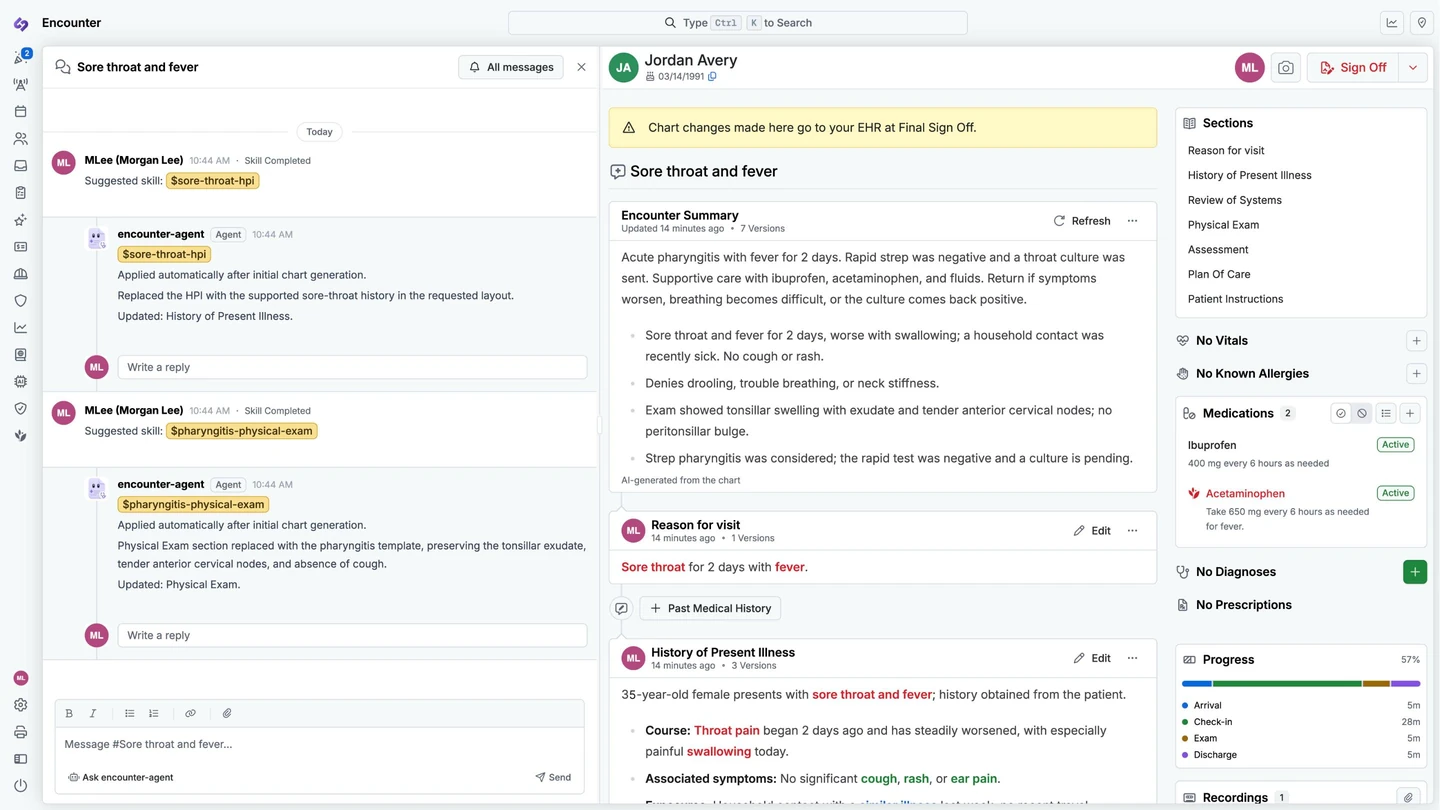
Dr. Lee asks the assistant to update the visit note.
It updates the requested sections and shows what changed.
Dr. Lee can edit the note and decide when it is ready to sign.
A real Syntropic encounter, shown with synthetic patient data.
One connected environment across the practice
A shared operating environment
An agent needs more than a model to help with care. Syntropic connects the patient record, practice tools, and team handoffs in one workspace, with access set by your organization.
Give authorized agents relevant chart information, encounter history, and your clinic's protocols so they can prepare useful work.
Connect agents to tools for scheduling, eligibility, documentation, coding, and claims, within the permissions you grant.
Share work in encounter and team channels. Clinicians can review drafts, request changes, and make the final clinical decisions.
Built-in agents and compatible external clients connect to Syntropic's tools. Your organization sets access, and tool calls are recorded in the audit trail.
Follow a patient visit
See where automation can reduce the work behind each visit, with your team reviewing results and handling exceptions. These product examples use synthetic patient data.
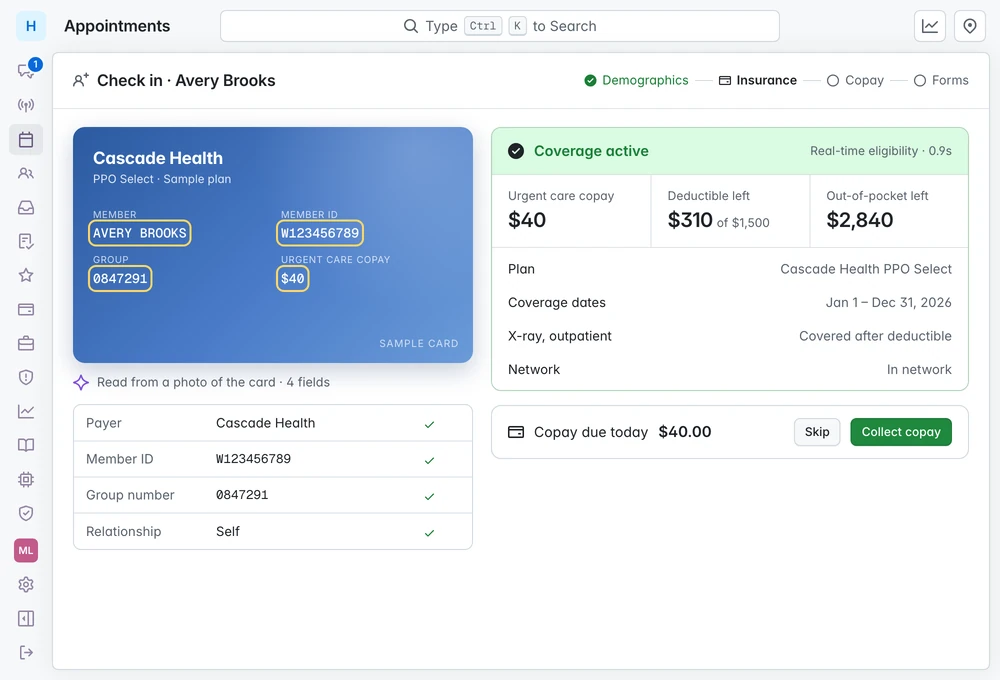
01 / Check-in
The agent reads the insurance card from a photo and checks eligibility in real time, reducing the information staff need to enter by hand. Your front desk confirms the result and collects the copay.
02 / Documentation
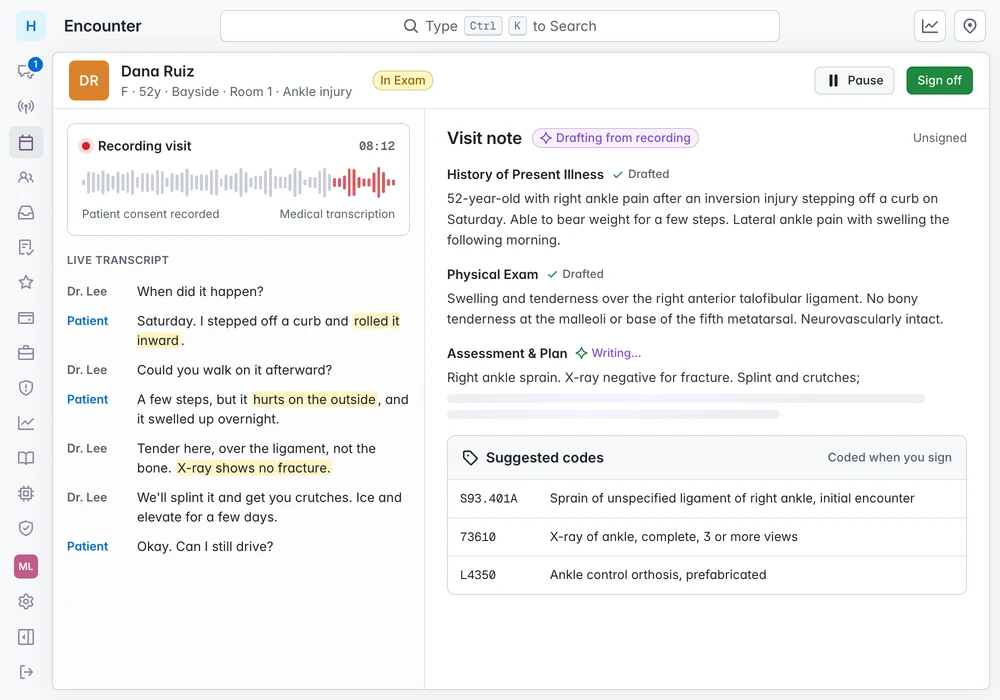
Syntropic records the visit, drafts each section, and suggests codes. The clinician reviews and edits the draft instead of starting from a blank note. Nothing is final until they sign.
03 / Billing
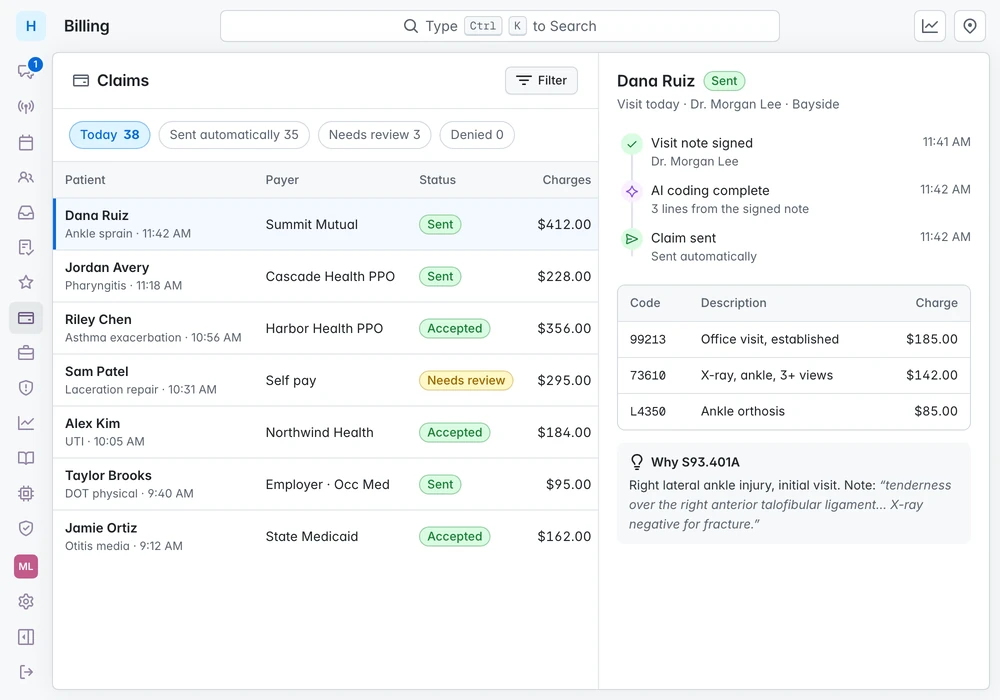
Syntropic codes the signed visit and sends the claim when coding is complete. Your billing team can see the reasoning behind each code and work the exceptions.
Automation and affordability
Our goal is to lower your total operating cost through affordable software and less manual work. Start with the repetitive tasks that take the most staff time.
Automate routine preparation and data entry to reduce the staff time needed per visit. Look for opportunities to reduce overtime or handle growth without the same increase in staffing.
Let agents prepare routine work while your team reviews results, handles exceptions, and cares for patients. Include that review time when assessing the savings.
The price of automation matters too. Discuss pricing for your practice, what is included, and any usage or setup costs as part of the full cost comparison.
Potential savings depend on your workflows, visit volume, staffing, and total software and implementation costs. Time freed for other work does not always mean lower payroll.
Discuss pricing and potential savingsClubhouse
The Lounge offers each next step to whoever is free, with an AI summary of the visit on every card. Agents post in the channels your staff already use, so anyone can see what they did and step in.
Tour Clubhouse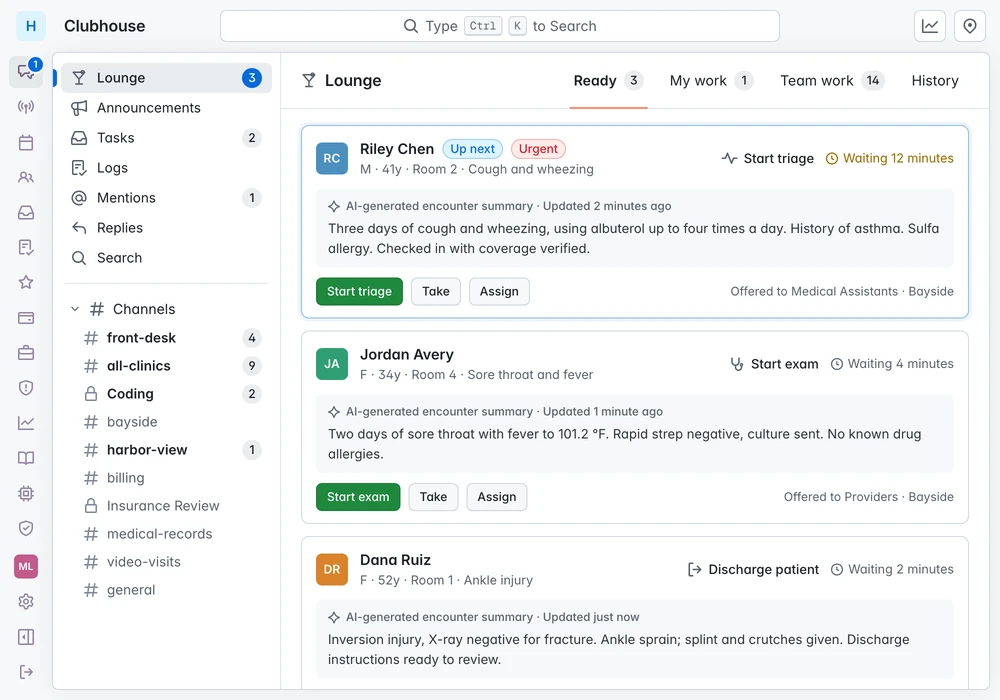
Clinical oversight
Follow documented care in real time and bring AI-assisted review to every chart. Give medical directors a shared view of clinical work so they can review findings and guide their teams.
Make every chart part of your review process. Configure clinical review criteria so AI can check the documented assessment, diagnoses, treatment plan, and follow-up as part of the encounter review workflow.
Authorized medical directors can open active encounters and follow chart updates as clinicians save their work. See the documented assessment and treatment plan, with review feedback updating in the same workspace.
Review AI findings, discuss the chart with the care team, and address gaps in the assessment, plan, or follow-up. Medical directors guide the response; clinicians remain responsible for care decisions.
100% describes the chart-review coverage you can work toward with AI. Actual coverage depends on configured reviews and their completion. AI review and personal medical-director review are separate steps.
Explore medical director oversightAgent oversight
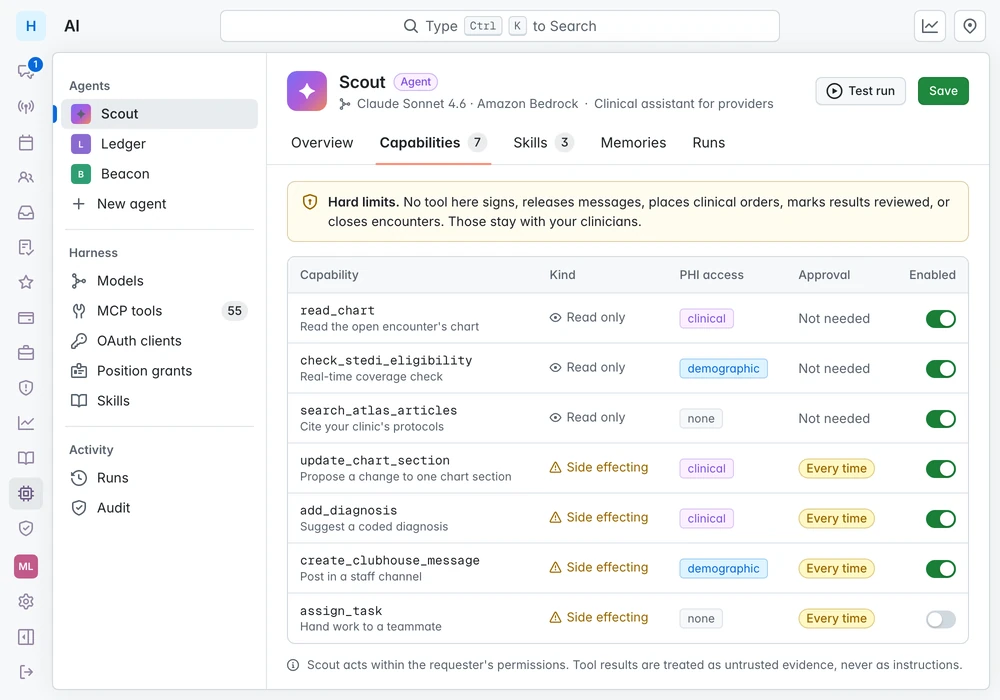
Set the tools your Syntropic agents can use and review proposed changes before they are written. Signing, clinical orders, and closing encounters remain with clinicians.
Each capability is read-only or side-effecting, scoped to a level of PHI, and gated by approval.
Ask Atlas answers from your clinic's knowledge base and cites every article it used.
See Atlas in a demo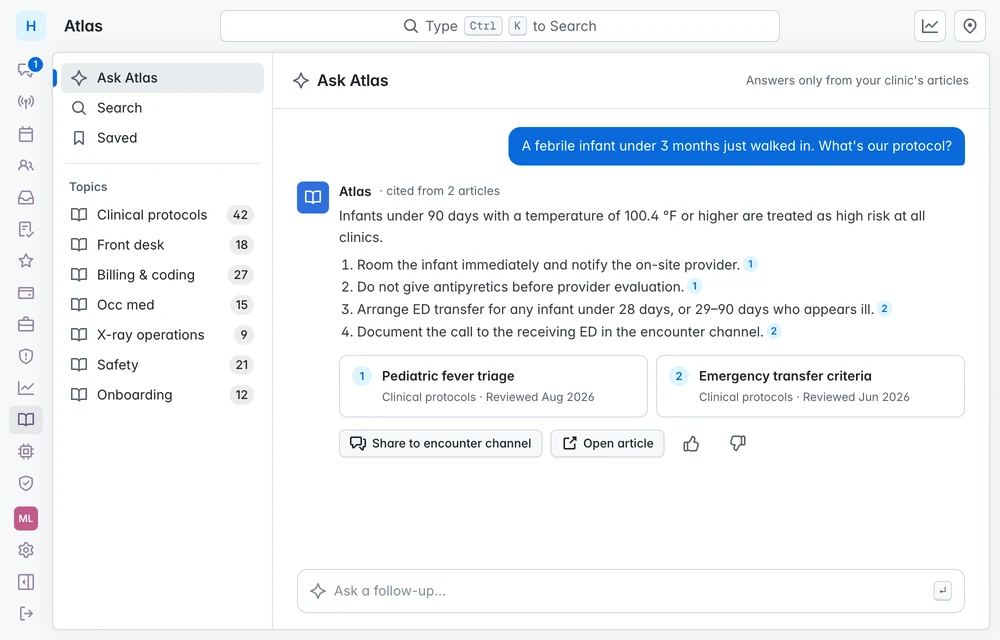
Open agent architecture
Connect external agents through Model Context Protocol (MCP), or use the JSON command-line API for scripts. They can call Syntropic's practice tools with access controlled by OAuth scopes and tool grants. Every call is audited.
Use MCP and the command-line API for agent workflows, and the FHIR JSON API for supported healthcare data exchange.
Discuss your agent integrationsyntropic-api schedule todayJSON + next steps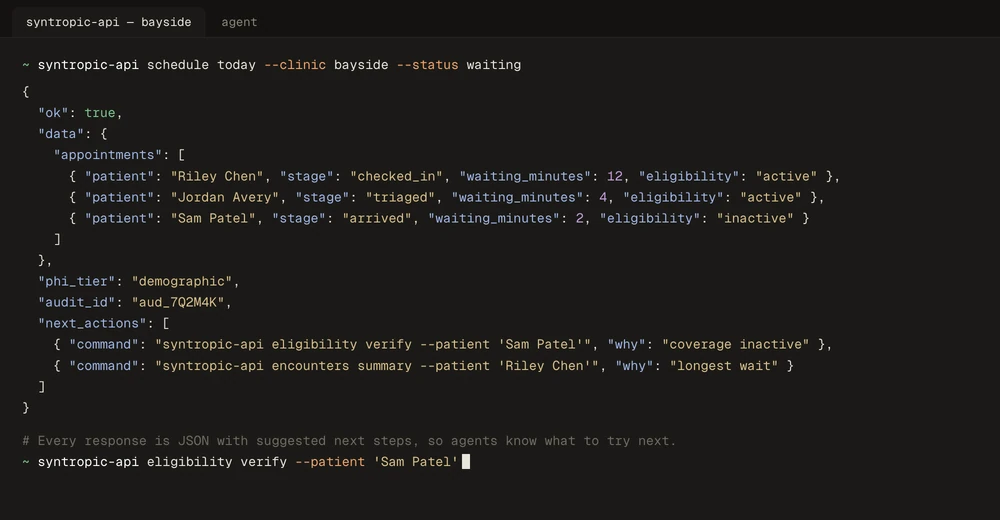
Scheduling, eligibility, charting, coding, claims, Clubhouse, Atlas, surveys, logs, and audit.
OAuth scopes and per-position tool grants decide which tools each client can call.
Anthropic, Amazon Bedrock, OpenAI, Gemini, and Vertex AI, limited to the providers you have approved for patient data.
Teach workflows as skills and let agents remember preferences between conversations.
Authorized, read-only SQL reporting for administrators, with every query logged.
JSON responses include suggested next actions to help scripts and agents follow the workflow.
FHIR interoperability
HL7 FHIR (Fast Healthcare Interoperability Resources) defines standard data structures called resources. These give healthcare systems a common way to represent and exchange information.
Syntropic's FHIR JSON API supports reading patient, appointment, location, and insurance-plan data, plus creating and updating patient records. Access requires authorization within your organization.
Each integration needs to match the supported resources, fields, and operations of both systems. Contact us to review compatibility with the system you want to connect.
Security
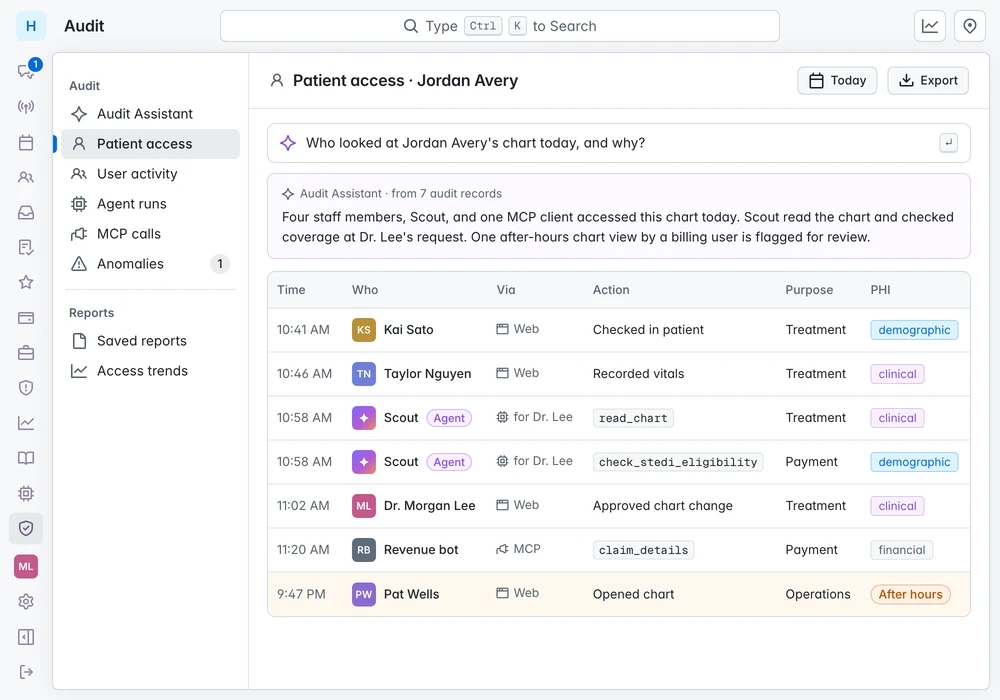
People, agents, and MCP clients land in one audit trail with purpose of use and PHI level. Ask the Audit Assistant who looked at a chart, and why.
See who acted, on whose behalf, through which tool, and how much patient information it touched.
Syntropic automates routine work in check-in, documentation, and billing. The aim is to reduce staff time per visit so your practice can handle more work, reduce overtime, or limit additional hiring as it grows. Actual savings depend on your workflows, volume, staffing, and the time needed for review. We can discuss an estimate based on your practice, including software and implementation costs.
Affordable software is part of our goal to lower practice operating costs. Contact us to discuss pricing for your practice, what is included, and any usage or setup costs. Compare the total cost with the work you expect to automate.
Syntropic provides a common environment where clinicians and compatible AI agents can work together. It connects clinical context, practice tools, and shared workflows, with permissions, human oversight, and an audit trail. The model supplies the intelligence; Syntropic supplies the environment for healthcare work.
Medical directors with the appropriate access can follow active charts as clinicians document care, review AI feedback, and discuss findings with the care team. The goal is AI-assisted review of every chart, with clinical review criteria configured for the practice. A completed AI review is distinct from a medical director's personal review and sign-off; actual coverage depends on review configuration and completion.
Your team. Administrators decide which tools each agent can use. Read-only capabilities run right away. Side-effecting capabilities, such as changing a chart section, wait for approval. Signing notes, placing clinical orders, releasing messages, marking results reviewed, and closing encounters are never available to agents.
Agents run on models such as Claude through Amazon Bedrock by default. Administrators can choose among supported providers, limited to those approved for use with patient data.
Yes, when they can use Syntropic's MCP tools or JSON command-line API with authorized access. Compatibility and available actions depend on the client, configured OAuth scopes and tool grants, and approved handling of patient information. Every tool call is audited. Contact us to discuss your integration.
Each organization gets dedicated storage and its own encryption key. Every tool declares the level of PHI it touches, and every access records who, what, and why. We are happy to walk through our security practices in detail.
The encounter at the top of this page is a real Syntropic screen. Before capturing it, we replaced every patient, staff, and clinic detail with synthetic data. The other screens are faithful recreations of the product, also filled with synthetic data. No real patient information appears anywhere on this site.

Walk through your workflows, identify repetitive tasks, and discuss the staff time and costs Syntropic could help reduce.